Update context of multiple files in File Storage
Updates the context of multiple files in an InVision File Storage.
Use this operation for batch operations when you need to update the context of multiple files.
A context defines what a file is associated with, for example a project, employee or product. The context can be a composite definition, meaning it can be associated with a combination of multiple entities such as a project, employee and product.
Example 
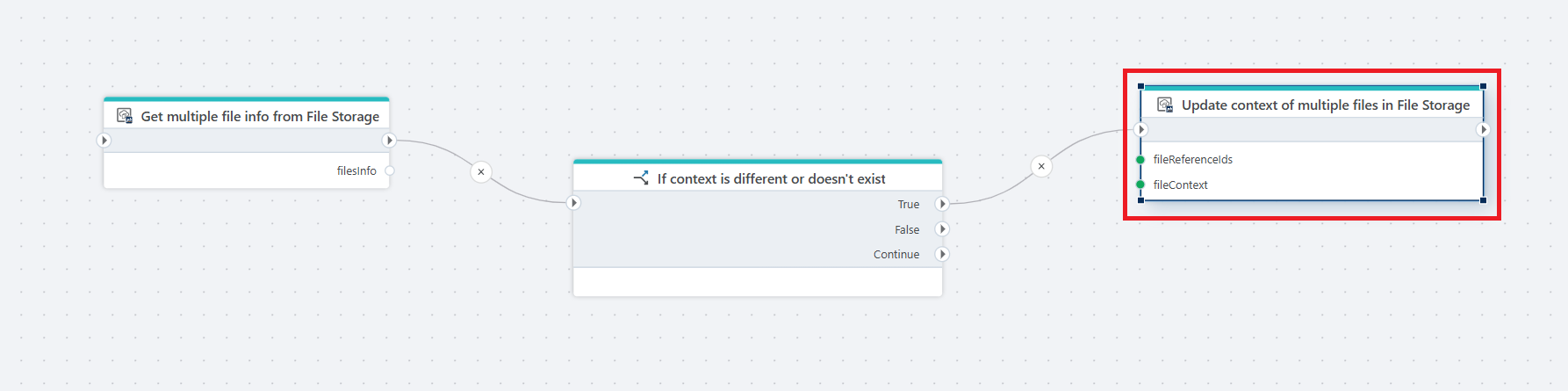
This flow updates the context of multiple files only when the existing context is different or does not exist. It starts with Get multiple file info from File Storage, which retrieves metadata for the specified files and stores the result in filesInfo. Next, an If action checks whether the current context of the files is different from the provided context or not defined. If the condition is True, the flow calls Update context of multiple files in File Storage, passing the fileReferenceIds and the new fileContext. This updates the context for all specified files. If the condition is False, the flow continues without making any changes.
Properties
| Name | Type | Description |
|---|---|---|
| Connection | Required | The InVision connection used to access File Storage. |
| File storage | Required | The File Storage where the files are located. |
| File references | Required | The list of file reference IDs for the files whose context should be updated. |
| File context | Required | The new context value to assign to the files. |
| Disabled | Optional | If selected, the action will not execute. |
| Description | Optional | A custom description of the action configuration. |