Execute SQL Script returning DataPackage
Executes an SQL Script in an InVision Solution that returns a DataPackage.
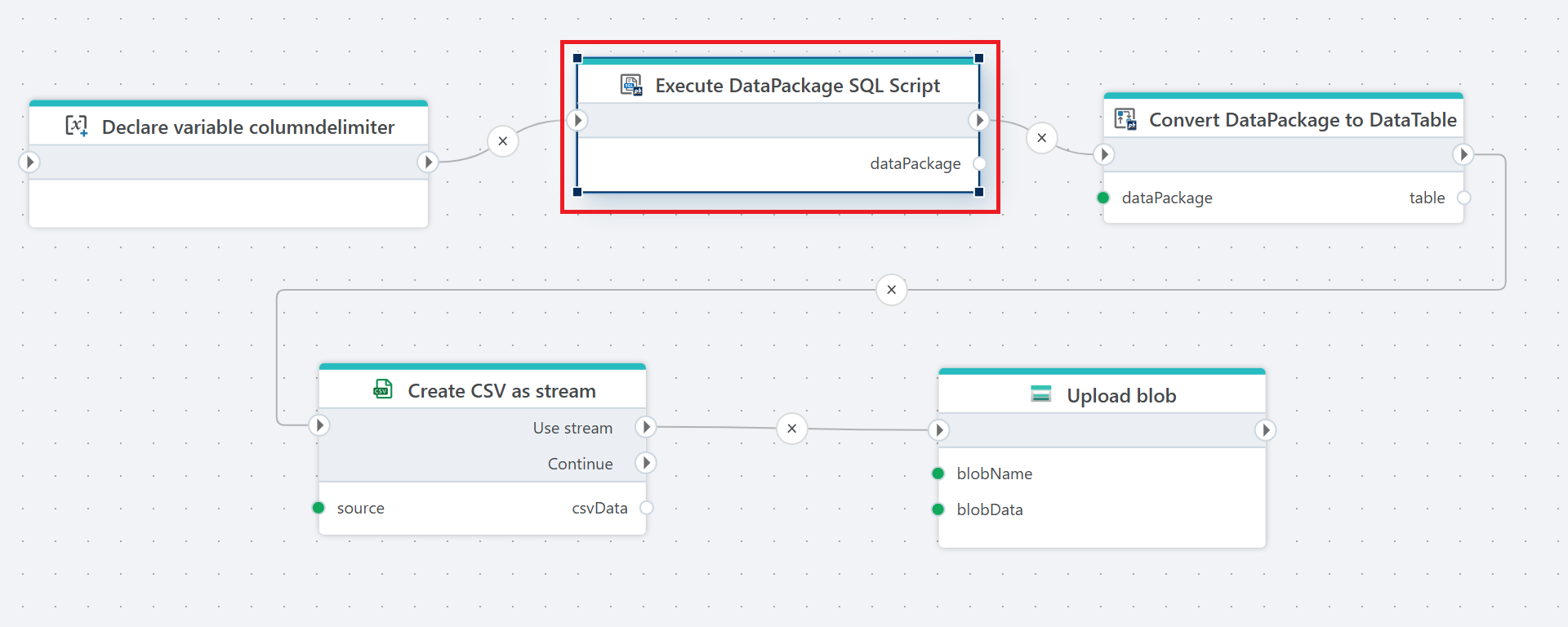
Example 
This flow executes a SQL script to retrieve DataPackage, converts the result into a table, generates a CSV file from the data, and uploads the file to blob storage.
Note
The SQL Script must take less than 5 minutes to complete.
Convert to .NET DataTable
To work with the data returned from the action, convert the result to a .NET DataTable using the Convert DataPackage to DataTable action. The DataTable can then be used by other actions, such as Function for custom business logic, exporting to Excel, PDF, CSV, or Parquet, writing to databases like PostgreSQL or SQL Server, and more.
Properties
| Name | Type | Description |
|---|---|---|
| Title | Optional | A descriptive label for the action displayed in the Flow editor. |
| Connection | Required | Defines the InVision connection used to execute the SQL script. |
| SQL Script | Required | The InVision SQL Script to execute. This script is created and stored in InVision. |
| Language | Optional | Specifies the language context used during execution, typically for localization or translations. |
| Parameters | Optional | Defines input parameters passed to the SQL script. Supports static or dynamic parameter mapping. |
| Result variable name | Optional | The name of the variable that will store the returned DataPackage. |
| Disabled | Optional | When enabled, the action will be skipped during flow execution. |
| Description | Optional | Additional notes or comments about the action configuration. |
Returns
Returns a DataPackage containing the result of the SQL script execution.